Pickleball group management
Play the points. Score on Apple Watch.
Keep your phone off the court. See your match and teams on Apple Watch, record points between rallies, and save the result when you finish. Prefer your phone? Enter a final score in seconds.
Less phone. More pickleball.
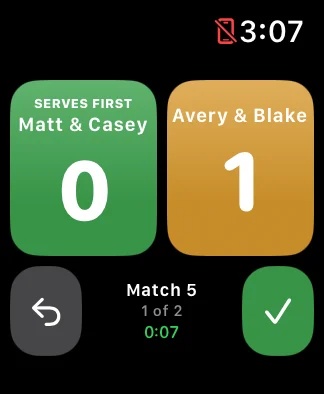
Check the match number, players, court, and score on Apple Watch. Record points, correct either score, and save the match. Saved results stay on Watch until they can sync with your paired iPhone.
Always free for players.
How DinkJar helps
- Score on Apple Watch between points, or enter final scores on your phone.
- Track wins, losses, points, streaks, partner records, and recent form.
- Give players a reason to come back after scores are entered.
- Preserve group history instead of losing results in memory or text threads.
Play the points. Save the match. Keep the history.
For four players rotating partners, follow the planned match number and teams. Score between points on Apple Watch, or enter the final score on your phone. Finish the match once; its result belongs to the same game day and updates the group history.
- Open the game day on your paired iPhone to prepare Watch access.
- Open DinkJar on Apple Watch and select your eligible game.
- Start your match, check the players and court, and record points.
- Save the match on Watch. Saved results stay on the device until they can sync.
Who this is for
Use it when the group already plays, but nobody can easily answer who won, who improved, which partners work well, or what happened last week.
Game-day workflow
Open your match
Check the match number, court, and players on your phone or Apple Watch.
Play and score
Record points on Apple Watch and correct either score when needed. Save the match once when play ends.
Save now. Sync when connected.
Saved Watch results stay on the device until they can sync with your paired iPhone. Synced results update player and group statistics.